 Mirco Cloud Primer

Photo by Engin Akyurt on Pexels
Picture three different ways of having a place to live: renting an empty apartment, renting a fully furnished one, or checking into a serviced hotel room. Each gives you shelter, but each hands you a different amount of responsibility and control. The three core cloud service models — IaaS, PaaS, and SaaS — work exactly the same way, just applied to computing instead of housing.
This article puts all three side by side, so you can quickly tell them apart and recognize which one you're dealing with.
The Three Models, Side by Side
Before comparing them in detail, it helps to see all three laid out together.
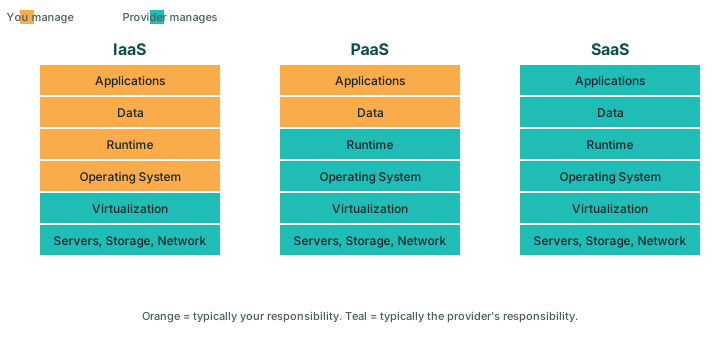
| Layer | IaaS | PaaS | SaaS |
|---|---|---|---|
| Application | You manage | You manage | Provider manages |
| Runtime & libraries | You manage | Provider manages | Provider manages |
| Operating system | You manage | Provider manages | Provider manages |
| Virtualization & hardware | Provider manages | Provider manages | Provider manages |
| Typical use case | Custom infrastructure, specific OS or network needs | Building and deploying an application quickly | Using a ready-made application as-is |
IaaS: The Empty Apartment
With IaaS, the provider hands you the fundamentals — processing power, storage, and networking — and you build everything on top yourself: operating system, runtime, and application. It's the most work, but also the most flexibility, similar to renting an empty apartment where every piece of furniture is your choice.
PaaS: The Furnished Rental
With PaaS, the provider also manages the operating system and runtime, leaving you responsible only for your application code and data. It's the furnished rental: utilities and furniture are already there, and you just move your own belongings in and start living.
SaaS: The Serviced Hotel Room
With SaaS, the provider manages literally everything, including the application itself. You don't write code or configure a runtime; you simply use the finished product, much like checking into a hotel room where housekeeping, maintenance, and amenities are entirely someone else's job.
A Quick Way to Tell Them Apart
- If you're installing an operating system yourself, you're almost certainly looking at IaaS.
- If you're writing and deploying your own application code, but never touch the operating system, you're likely looking at PaaS.
- If you're simply logging into a finished product and using its features, you're looking at SaaS.
How Organizations Typically Mix All Three
In practice, few organizations pick just one model and use it exclusively. A typical small business might run a custom internal tool on virtual machines under IaaS, deploy a customer-facing web application through PaaS for faster iteration, and rely on several SaaS tools — email, accounting, communication — for day-to-day operations. Recognizing which model a given tool belongs to simply helps you understand what you're responsible for and what the provider is responsible for, following the shared responsibility model in each case.
Choosing Between Them for a New Project
- Need full control over the environment? Lean toward IaaS.
- Want to focus purely on writing application code, without managing servers? Lean toward PaaS.
- Just need to accomplish a task using existing software, without building anything? Look for a SaaS product first.
A Worked Example: Launching One Small Business Online
Imagine a small bakery setting up its first online presence. For its public-facing website, it signs up for a SaaS website builder, since there's no custom application to build and no reason to touch any code. For a custom online ordering system its owner commissions from a developer, that developer deploys the application through a PaaS platform, focusing purely on the ordering logic rather than server maintenance. And if, down the line, the bakery needs a highly specific piece of infrastructure — say, a dedicated virtual machine running specialized point-of-sale integration software — that piece might be built on IaaS instead. One small business, three different service models, each chosen because it fit a specific need rather than because it was the only option considered. Larger organizations go through the same reasoning on a bigger scale, re-evaluating which model fits each individual project rather than assuming one choice must govern everything they build.
Common Mistakes Beginners Make
- Treating the three models as strictly competitive rather than complementary. Most real organizations blend all three.
- Choosing IaaS out of habit when a PaaS or SaaS option would save significant time. More control isn't always more useful for a given task.
- Assuming SaaS means no responsibility at all. You still manage your account, data, and user access.
- Not revisiting the choice as a project grows. A model that fit a small project might not fit the same project at a larger scale.
Frequently asked questions
Which service model should a beginner start learning with?
There's no universally right answer, but many beginners find SaaS the easiest starting point since it requires no technical setup, followed by PaaS once they start writing code, and IaaS once they want to understand infrastructure in more depth.
Can an organization use all three models at the same time?
Yes, and most organizations of any size do. A company might run custom infrastructure on IaaS, deploy an internal application on PaaS, and use several SaaS tools for email, accounting, or communication, all at once.
Is one service model always cheaper than the others?
Not inherently, and this article doesn't compare specific costs. Cost depends heavily on usage patterns, team expertise, and how well a given model fits the task at hand.
Do IaaS, PaaS, and SaaS all follow the shared responsibility model?
Yes. Every model splits responsibility between you and the provider, but exactly where that line falls shifts depending on how much the provider manages for you.
Related reading
Sources
- NIST SP 800-145 — The NIST Definition of Cloud Computing
- Documentation published by major public cloud providers (consulted October 2026)