 Mirco Cloud Primer
Photo by Wolfgang Weiser on Pexels
Beginners researching how applications run in the cloud almost always run into these two terms side by side, usually without a clear explanation of how they differ. Both a virtual machine and a container let you run software in an isolated way on shared hardware, but they achieve that isolation very differently, and that difference changes how each one starts up, how much space it takes, and what it's best suited for.
This article lines the two up directly, so you can see exactly where they overlap and where they don't, and ends with guidance on which one tends to fit which kind of project.
The core difference: how much each one virtualizes
A virtual machine virtualizes an entire computer, including a full operating system, which it runs on top of a hypervisor. A container virtualizes only the application layer, sharing the operating system kernel of the machine underneath it rather than bringing its own. That one distinction explains almost every other difference between them.
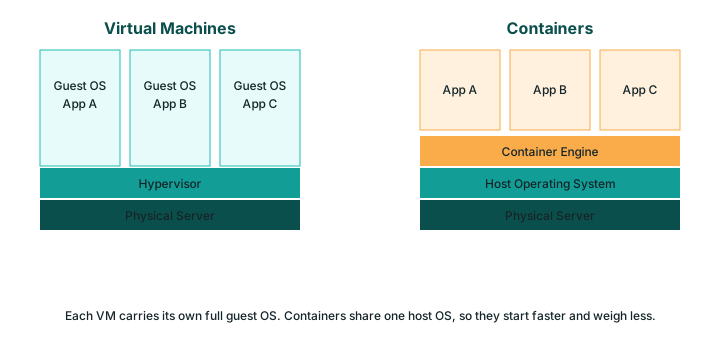
| Characteristic | Virtual Machine | Container |
|---|---|---|
| What's virtualized | An entire computer, including its own operating system | Only the application and its dependencies; the OS kernel is shared |
| Typical startup time | Around a minute, sometimes longer | A fraction of a second to a few seconds |
| Isolation level | Very strong — each VM is fully separate down to the operating system | Good, but less strict than a VM since the kernel is shared |
| Typical size on disk | Gigabytes, since a full OS is included | Megabytes, since only the application and dependencies are included |
| Typical use case | Running a different operating system, or workloads needing strict isolation | Packaging and quickly deploying individual application components |
Why isolation strength matters
Because a virtual machine includes its own operating system from top to bottom, it is extremely difficult for anything happening inside one VM to affect another VM on the same physical hardware, which is part of the thinking behind the shared responsibility model that cloud providers rely on. A container's isolation is good enough for the vast majority of everyday applications, but because it shares a kernel with its neighbors, it is generally considered a slightly thinner boundary than a full virtual machine provides.
Why startup speed and size matter in practice
A container's small size and near-instant startup make it well suited to situations where you need to create and destroy instances constantly — for example, automatically adding more copies of an application during a busy period, a behavior closely tied to auto-scaling. A virtual machine's slower startup and larger footprint make more sense for workloads that are expected to run continuously for a long time, where the extra minute of startup barely matters.
When to choose a virtual machine
- You need to run a specific operating system that differs from the host machine's own OS.
- Your workload requires the strongest possible isolation from everything else on the same hardware.
- You're running a single, long-lived application that doesn't need to be split into smaller pieces.
When to choose a container
- You want an application to start almost instantly and scale up or down quickly.
- You're building an application out of several small, independent services (microservices).
- You want the exact same package to behave identically across a developer's laptop, a test system, and a live server.
They are often combined, not competing
In real cloud environments, it's extremely common to run many containers inside one or more virtual machines — getting the strong isolation and flexibility of a VM at the outer layer, and the speed and portability of containers at the inner layer. Neither approach has made the other obsolete; they solve different layers of the same problem.
A practical way to decide between them
If you're not sure which one fits your situation, start by asking what the workload actually needs rather than which term sounds more modern. A task that must run a specific operating system, or that absolutely cannot share anything with its neighbors, points toward a virtual machine every time. A task that's expected to start and stop frequently, or that's part of a larger application built from many small, independently updated pieces, usually points toward a container instead. Many teams end up using both: containers for the fast-moving, frequently updated parts of an application, and virtual machines for the parts that need stronger isolation or a particular operating system that containers can't provide on their own.
Common mistakes beginners make
- Assuming one option is simply an upgraded version of the other, rather than two different tools for different jobs.
- Choosing a virtual machine out of habit for a task that a lightweight container would handle more efficiently.
- Assuming a container offers virtual-machine-level isolation when strict separation is actually required.
- Not realizing the two are frequently used together rather than as a strict either-or choice.
Frequently asked questions
Which is better, a virtual machine or a container?
Neither is universally better — a virtual machine offers stronger isolation and the ability to run a different operating system, while a container starts faster and uses fewer resources, so the right choice depends on what the project actually needs.
Can virtual machines and containers be used together?
Yes, and this is actually very common: cloud providers frequently run containers inside virtual machines, which combines the strong isolation of a VM with the speed and efficiency of containers.
Do containers replace virtual machines?
Containers have not replaced virtual machines; they solve a different problem and are often used alongside VMs rather than instead of them, especially when an application genuinely needs a separate operating system or very strict isolation.
Which one should a complete beginner learn first?
Many beginners find virtual machines more intuitive to start with, since they behave like a familiar computer, while containers involve a few more concepts upfront — but either is a reasonable starting point depending on the specific project.
Related reading
Sources
- NIST SP 800-145 — The NIST Definition of Cloud Computing
- Official project documentation for Kubernetes and Docker (consulted October 2026)
- Documentation published by major public cloud providers (consulted October 2026)