 Mirco Cloud Primer

Photo by Tiger Lily on Pexels
Every cloud account eventually needs somewhere to put data: photos, documents, website files, database records, or the disks that a virtual machine runs on. Cloud providers offer more than one way to store that data, and each one is built for a different kind of job. This guide breaks down the three storage types beginners run into most often, object storage, block storage, and file storage, using plain language and everyday comparisons so you can tell them apart without needing a computer science background.
The three main ways cloud storage is organized
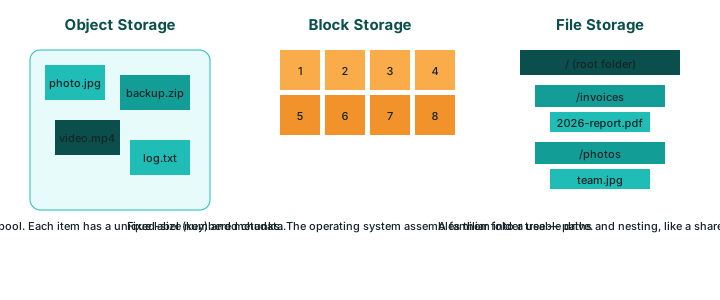
Cloud storage isn't one single product; it's a family of services that organize data differently depending on how an application needs to read or write it. Object storage treats each item as a self-contained package with a label attached. Block storage slices storage into fixed-size chunks that behave like a raw, unformatted disk. File storage organizes everything into folders and subfolders, much the way files are arranged on a shared office computer. None of these approaches is universally better than the others. The right choice depends entirely on what you are storing, how often it changes, and how many things need to access it at once.
Object storage: labeled boxes in a warehouse
Picture a vast warehouse where every item is sealed inside its own box, and every box carries a unique label describing exactly what is inside. You never need to know which shelf a box sits on; you simply ask for the box by its label, and the warehouse retrieves it for you. That is roughly how object storage works: every file is stored as an independent 'object' with a unique identifier and descriptive metadata attached to it, rather than a location in a folder tree. Object storage is particularly good at holding enormous numbers of files that do not change often, such as images, videos, backup archives, and website assets, because it scales to huge volumes without asking you to manage a folder structure yourself.
Block storage: numbered drawers in a filing cabinet
Block storage behaves more like a filing cabinet made of identical, numbered drawers. The cabinet itself has no idea what is inside each drawer; that decision is left entirely to whoever is using it. In cloud terms, block storage is typically attached to a single virtual machine and formatted with a file system, much like plugging in an external hard drive to one computer. Because the virtual machine gets direct, low-level access to these numbered chunks, block storage tends to deliver fast and consistent performance for demanding tasks such as running a database engine or an operating system's own disk.
File storage: a shared folder tree everyone can browse
File storage looks the most familiar to most beginners, because it mirrors how files are organized on a typical computer: folders inside other folders, each holding individual files with ordinary names. Several servers or applications can often connect to the same file storage system at once and browse it the way several coworkers might share one networked office drive. That shared-access quality makes file storage a natural fit for situations where more than one application needs to read and write the very same files at the same time, without each one keeping a separate copy.
| Storage type | How data is organized | Typical use case | Example workload |
|---|---|---|---|
| Object storage | Independent items with a unique ID and metadata, no folder hierarchy | Large volumes of rarely-changed files | Website images, video archives, backup files |
| Block storage | Fixed-size chunks attached to one machine, formatted like a raw disk | Performance-sensitive, single-attachment workloads | Database disks, operating system volumes |
| File storage | Folders and subfolders, shared across multiple connections | Shared access from several applications or servers at once | Shared document libraries, content management systems |
Choosing the right storage type for a task
A simple way to decide is to ask three questions in order. Will many independent files be stored and rarely modified afterward? Object storage usually wins. Does one single machine need fast, direct, disk-like access to its own storage? Block storage is the natural fit. Do multiple applications need to read and write the same folder structure at the same time? File storage is designed for exactly that scenario. Many real applications end up combining more than one storage type: a website, for instance, might keep its images in object storage while the database behind it runs on block storage, and shared configuration files live in file storage that several servers can reach.
Common mistakes beginners make
- Assuming all cloud storage behaves like a hard drive, then getting confused when object storage won't let you 'browse folders' the way a file system does.
- Storing a frequently-changing database directly in object storage, which is optimized for infrequent changes rather than constant small updates.
- Trying to attach one block storage volume to more than one virtual machine at the same time, which most block storage systems do not support.
- Forgetting that choosing a storage type and having a backup strategy are two separate decisions; picking the right storage type does not replace having an actual backup plan.
Frequently asked questions
Can I switch from one storage type to another later?
Usually yes, but it normally means migrating the data rather than flipping a setting, since each storage type organizes data in a fundamentally different way.
Is object storage less secure than block or file storage?
No. Security depends on how access is configured, not on which storage type you pick. All three types support encryption and access controls when set up correctly.
Do I need to understand all three types before starting a project?
No. Most beginners only need to recognize which type the service they're already using relies on; understanding the differences simply helps you ask better questions later.
Which storage type is the cheapest?
Cost depends on the provider and the specific plan, and this guide intentionally avoids pricing comparisons. Check your provider's current documentation for cost details.
Related reading
Sources
- NIST SP 800-145 — The NIST Definition of Cloud Computing
- Documentation published by major public cloud providers (consulted October 2026)